Arduino
The Paapeli AIoT Cloud Platform provides a lightweight Arduino SDK for securely sending telemetry data and receiving commands over MQTT.
This example uses an ESP32 with a DHT22 sensor to send real temperature and humidity values.
MQTT Ports
Paapeli supports both secure and insecure MQTT ports:
| Mode | Port | Description |
|---|---|---|
| Secure TLS | 8883 | Recommended for production |
| Insecure MQTT | 1889 | Useful for testing or devices without TLS support |
Device Token
Before connecting your device, you must:
- Log in to the Paapeli Dashboard
- Add a new Device
- Copy your Device Token
- Paste it into the code
Your device token will be used as the MQTT password.
Example:
const char* device_token = "PAAPELI_DEVICE_TOKEN";
DHT22
The DHT22 has three pins, numbered from left to right when the sensor is facing you (label side visible):
Pin 1 — VCC (Power) Connect to: 3.3V on the ESP32 Wire color (in diagram): Red This powers the DHT22 sensor (it must use 3.3V when connected to an ESP32).
Pin 2 — DATA (Signal) Connect to: GPIO4 on the ESP32 Wire color (in diagram): Yellow This is the pin that sends temperature and humidity data from the sensor to the ESP32. In the code, this matches:
#define DHTPIN 4
Pin 3 — GND (Ground) Connect to: GND on the ESP32 Wire color (in diagram): Black This completes the electrical circuit between the sensor and the ESP32.
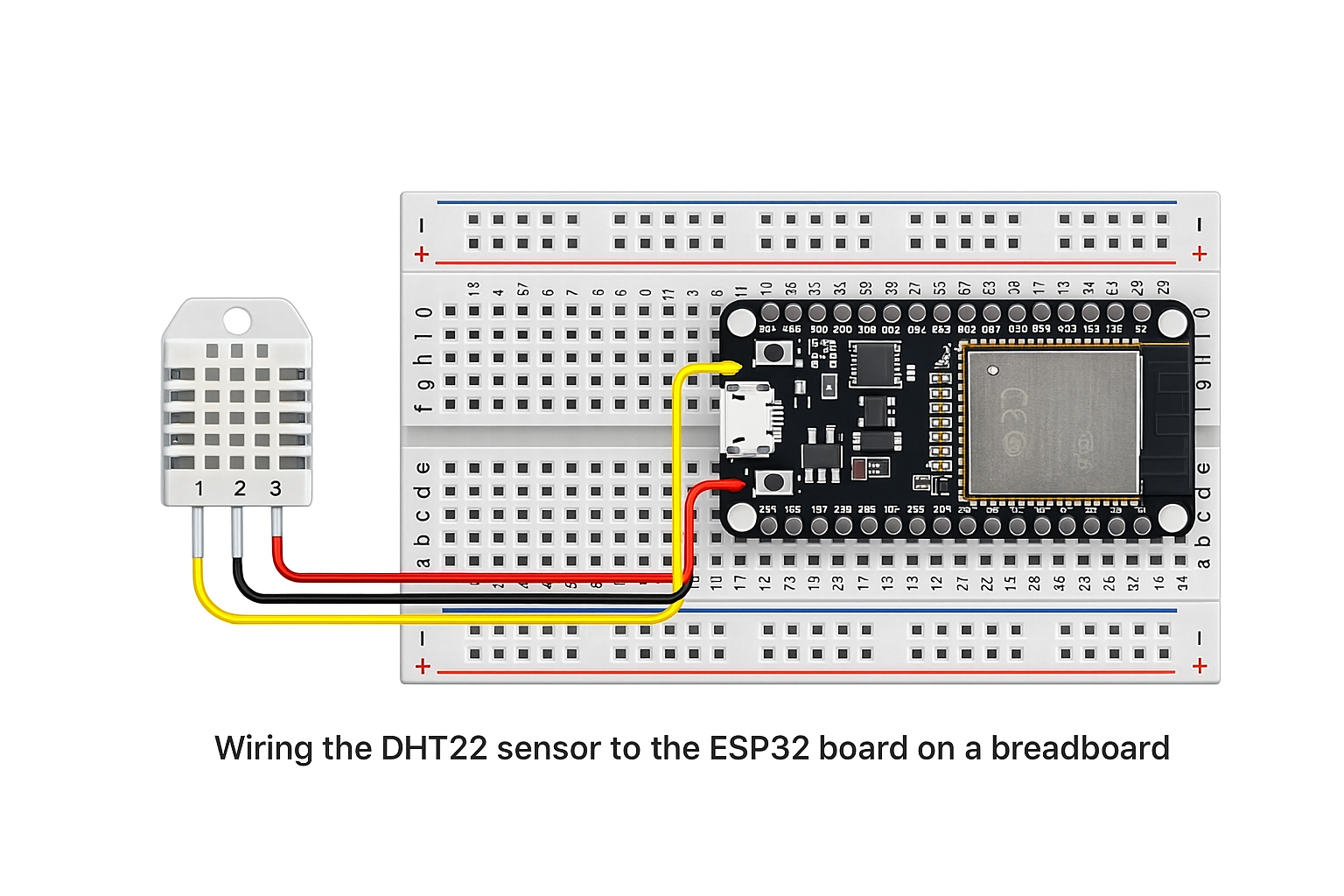
Basic Example (ESP32 + DHT22)
This example demonstrates:
- Connecting to Wi-Fi
- Connecting to Paapeli MQTT
- Reading temperature & humidity from a DHT22 sensor
- Sending real telemetry data
#include <PubSubClient.h>
#include <DHT.h>

// --- Wi-Fi Configuration ---
const char* ssid = "YOUR_WIFI_SSID";
const char* password = "YOUR_WIFI_PASSWORD";

// --- MQTT Configuration ---
const char* mqtt_server = "mqtt.paapeli.com";
const int mqtt_port = 8883;   // use 1889 for insecure mode

// Device token from Paapeli dashboard
const char* device_token = "PAAPELI_DEVICE_TOKEN";

WiFiClientSecure espClient;
PubSubClient client(espClient);

// --- DHT Sensor Setup ---
#define DHTPIN 4
#define DHTTYPE DHT22
DHT dht(DHTPIN, DHTTYPE);

// --- MQTT Command Callback ---
void callback(char* topic, byte* payload, unsigned int length) {
  Serial.print("Command received on: ");
  Serial.println(topic);
}

// --- Connect to Wi-Fi ---
void setup_wifi() {
  Serial.print("Connecting to WiFi...");
  WiFi.begin(ssid, password);

  while (WiFi.status() != WL_CONNECTED) {
    delay(500);
    Serial.print(".");
  }

  Serial.println("\nWiFi connected!");
}

// --- Reconnect to MQTT ---
void reconnect() {
  while (!client.connected()) {
    Serial.print("Connecting to MQTT...");

    // MQTT authentication with device token
    if (client.connect("arduino-client", device_token, NULL)) {
      Serial.println(" connected");
      client.subscribe("device/mydevice/command");
    } else {
      Serial.print(" failed, retrying...");
      delay(3000);
    }
  }
}

// --- Setup ---
void setup() {
  Serial.begin(115200);

  setup_wifi();
  dht.begin();

  espClient.setInsecure();  // remove when using TLS certificates
  client.setServer(mqtt_server, mqtt_port);
  client.setCallback(callback);
}

// --- Main Loop ---
void loop() {
  if (!client.connected()) {
    reconnect();
  }
  client.loop();

  float t = dht.readTemperature();
  float h = dht.readHumidity();

  if (isnan(t) || isnan(h)) {
    Serial.println("Failed to read DHT22!");
    return;
  }

  // Short JSON payload
  String payload = "{\"t\":" + String(t) + ",\"h\":" + String(h) + "}";

  client.publish("device/mydevice/telemetry", payload.c_str());

  Serial.println("Data sent: " + payload);
  delay(5000);
}